


If Media · Updated for 2026
For Canadian businesses that rely on local customers, visibility on Google is no longer optional. Whether you operate a storefront, office, or service-area business, your Google Business Profile plays a decisive role in how customers discover, evaluate, and choose your business.
In 2026, local search is more competitive, more visual, and more intent-driven than ever. Google continues to blend AI, maps, reviews, and behavioural signals into local results. Businesses that actively manage their profiles gain a clear advantage. Those who neglect them gradually lose visibility.
This guide is written specifically for Canadian small and mid-sized businesses. It explains how Google Business Profile works in Canada, how to set it up correctly, and how to optimize it for long-term local visibility. You’ll also learn how reviews, services, and performance signals influence rankings as Google evolves local search beyond simple listings.
What Is Google Business Profile and How It Works in Canada
Google Business Profile (GBP), formerly Google My Business, is the platform that controls how your business appears in Google Search and Google Maps.
Your profile displays essential information, including your business name, location, hours, website, services, photos, and reviews. It is often the first interaction a potential customer has with your brand. This highly structured data is now a primary source for Google’s AI-generated local answers, making profile completeness more crucial than ever.

When someone searches for:
- “coffee shop in Toronto”
- “auto repair in Red Deer”
- “web design in Edmonton”
Google prioritizes businesses with accurate, relevant, and actively managed profiles. In many cases, customers make decisions without ever visiting a website.
Think of your Google Business Profile as your digital storefront in Canada’s local search ecosystem.
Why Google Business Profile Matters for Canadian Small Businesses
For Canadian businesses, Google Business Profile is one of the most potent free marketing tools available.
A well-optimized profile helps you:
- Increase visibility in local search and map results
- Control your first impression with accurate business details
- Improve local SEO rankings without paid ads
- Build trust through reviews and ongoing activity
- Drive calls, directions, and website visits
In smaller Canadian cities and regional markets, a strong Google Business Profile often matters more than a large website or social media following.
How to Create a Google My Business Listing
Setting up a Google Business Profile is straightforward, but accuracy matters from the start.
Step 1: Create or Claim Your Profile
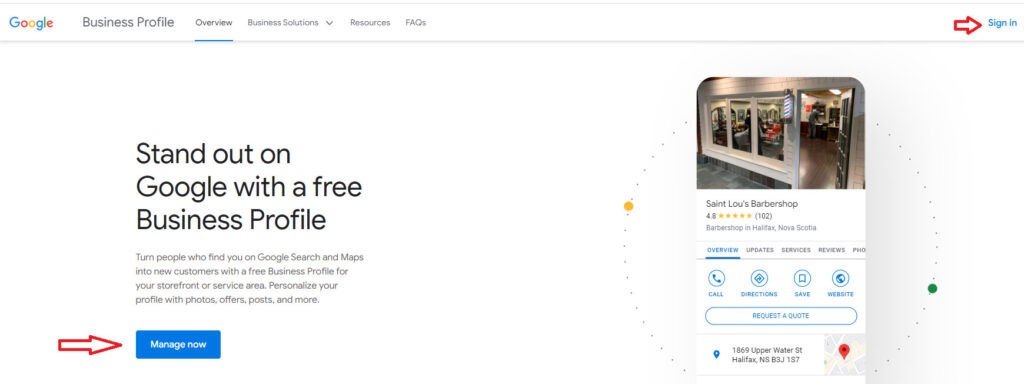
Visit business.google.com and sign in with your Google account. Search for your business name to claim an existing profile or create a new one.
Step 2: Enter Accurate Business Information

Add your real business name, address (or service area), phone number, website, and primary category. Consistency with your website and other online listings is critical.
Step 3: Verify Your Business

Google requires verification to confirm legitimacy. This may involve postcard, phone, email, or video verification, depending on your business type. Once verified, your profile becomes eligible to appear in local search results.
How to Optimize Your Google Business Profile for 2026
Creating a profile is only the beginning. Ongoing optimization determines whether your business stays visible over time.
Key optimization fundamentals include:
- Keeping business information accurate and current
- Uploading high-quality photos regularly
- Encouraging and responding to customer reviews
- Posting updates, offers, and announcements
- Actively managing services, products, and attributes
Businesses that treat Google Business Profile as an ongoing asset consistently outperform those that treat it as a one-time setup.
Common Google Business Profile Mistakes to Avoid in 2025
Many Canadian businesses lose visibility due to preventable errors.
Leaving Your Profile Unclaimed or Inactive
Inactive profiles send weak trust signals. Google prioritizes businesses that demonstrate ongoing engagement through updates, photos, and responses.
Keyword Stuffing the Business Name
Adding locations or services to your business name violates Google guidelines and can result in suspension. Always use your real, legal business name.
Incomplete or Outdated Business Information
Incorrect hours, missing services, or outdated phone numbers frustrate customers and reduce relevance, especially in local Canadian searches.
Ignoring Reviews and Customer Questions
Reviews strongly influence trust in Canadian markets. Failure to respond damages credibility and weakens engagement signals.
Treating GBP as “Set and Forget”
Profiles that are regularly updated with photos, services, and posts perform significantly better over time.
How Google Business Profile Impacts Local SEO in Canada
Google uses three primary signals to rank local businesses.
Proximity
How close your business is to the searcher. Accurate addresses and realistic service areas are critical in Canada, where cities and service regions are widely dispersed.
Relevance
How closely your profile matches search intent. Categories, services, and descriptions help Google understand exactly what you offer.
Prominence
How trusted and established your business appears. Reviews, activity, and consistency across the web all contribute to prominence.
Increasingly, this same profile data is also used by Google’s AI-generated local answers. Incomplete or outdated profiles are far less likely to appear in these results.
Businesses that actively manage these factors often work with providers offering Google Business Profile services in Canada to maintain accuracy and long-term visibility.
Why Reviews Matter More in Smaller Canadian Markets
In many Canadian cities and towns, customers have fewer choices. Reviews often carry disproportionate weight.
A small difference in:
- Review count
- Rating quality
- Response professionalism
Can determine whether a customer chooses your business or a competitor. Actively requesting reviews and responding publicly builds trust and improves rankings. Aim to respond to all reviews within 24 to 48 hours to demonstrate strong engagement.
Service Areas and City-Based Pages
For service-area businesses, precision matters. Listing too many cities or exaggerated service areas can reduce relevance rather than improve it.
Your Google Business Profile should closely align with the service areas and location pages on your website. This alignment strengthens local signals and supports city-specific service pages.
The connection becomes even clearer when supported by real-world results, such as a Google Business Profile case study that demonstrates measurable improvement.
The Google Business Profile Features That Matter Most in 2026
Google continues to shift Google Business Profile from a simple listing to an interactive conversion tool.
Services and Products Editor
Detailed services and product listings help Google match your profile to specific searches. This is now one of the strongest relevance signals, particularly for service-based businesses.
Direct Contact Links (WhatsApp and SMS)
After retiring its native chat feature, Google now supports direct links to high-intent external platforms. Adding a WhatsApp link or SMS text number allows customers to contact you with a single click, making response speed a key conversion factor.
Performance Insights
Google provides data on searches, calls, website clicks, and direction requests. Monitoring these insights helps you understand what drives real customer actions and where to improve.
Best Practices for Long-Term Google Business Profile Success
- Choose the most accurate primary category
- Write a clear, helpful business description
- Use keywords naturally, not aggressively
- Add relevant attributes and features
- Keep photos, services, and posts fresh
For most Canadian businesses, Google Business Profile performs best when paired with a broader strategy that includes local SEO services, connecting profiles, service pages, and location-based content into a consistent system.
Conclusion
A well-managed Google Business Profile is no longer just a listing. In 2026, it is a central pillar of local visibility, trust, and customer acquisition for Canadian businesses.
By setting up your profile correctly, avoiding common mistakes, and actively managing reviews, services, and performance signals, you position your business to compete and grow as local search continues to evolve.
Google will keep changing. Businesses that treat their Google Business Profile as a living asset will continue to win.
Canada-Specific FAQs About Google Business Profile
Verification timelines in Canada vary by business type and verification method. Most Canadian businesses are verified within 5 to 14 days, although video or postcard verification can take longer. Service-area businesses and regulated industries may require additional checks.
Yes. Google increasingly uses Google Business Profile data to generate AI-powered local answers. Complete profiles with accurate services, reviews, photos, and activity are far more likely to appear in AI Overviews and local AI summaries.
Canadian businesses should update their profile at least once per month. Adding new photos, updating services, posting announcements, and responding to reviews signals activity and trust, which supports long-term visibility.
Yes. Service-area businesses in Canada can rank without a public address, provided their service areas are clearly defined and consistent with website content. Accuracy matters more than size when setting service regions.
The most common ranking issues for Canadian businesses include keyword stuffing the business name, outdated hours or contact details, poor review management, exaggerated service areas, and inactive profiles with little engagement.
Yes. In smaller and mid-sized Canadian markets, reviews often have a greater impact on both visibility and customer trust. A difference of just a few reviews or a slightly higher rating can significantly affect rankings and conversions.
Yes. Google Business Profile is entirely free for Canadian businesses. Costs only apply if you choose to work with professional optimization or local SEO services.